Know what's
really left
until payday.
Your money is full of signals.
Yamma finds the useful ones.
Then gives you a clear next step.
- Period
- Payday to payday
- Bills
- Set aside on payday
- Access
- Read-only
- Sources
- Bank, Sheet or CSV
Not scary. Just clear.
- Should I be saving more? Should I skip the coffee? Where did it all go?
- What if money didn't need to be scary?
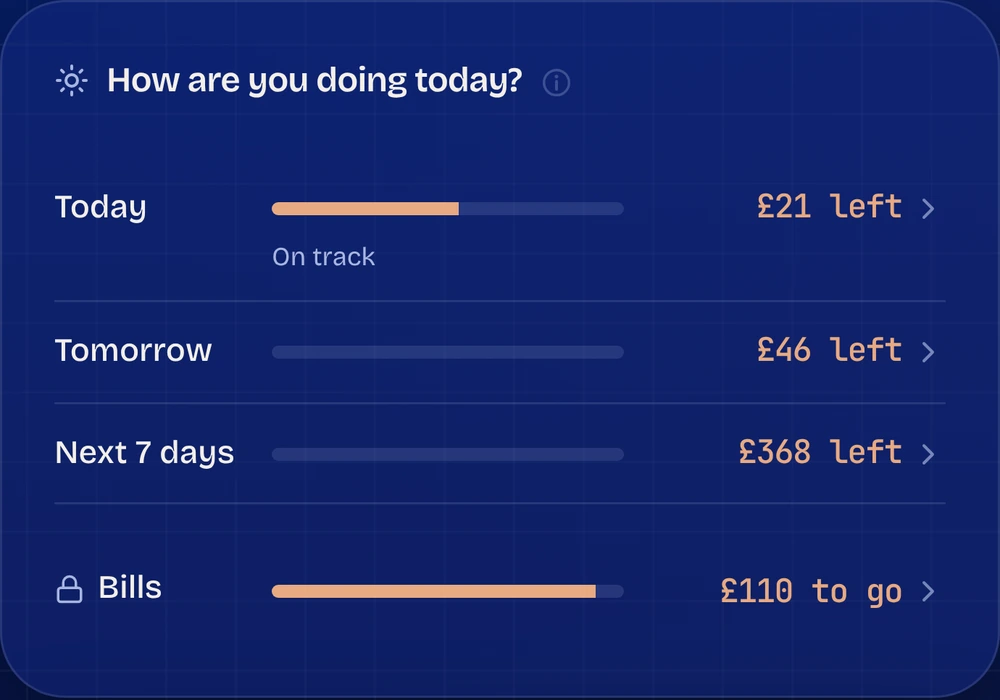
- Bills counted. The rest is yours. £1,240 paid, less £854 of rent, council tax and subscriptions, leaves £386. That's £32 a day until payday.
- Ask instead of wondering. Can I afford a £3.40 coffee? Yes. £382.60 left, still £32 a day.
- It won't guess. Why does this month feel tight? Your car insurance went up £64. Everything else is on track. Checked against your transactions.
- Not scary. Just clear.
- Yamma. Know what's really left until payday. Try for free.
From messy money to a clear next step.
- Step 01
Connect
Link your bank through Open Banking, sync a Google Sheet, or upload a CSV. Read-only, so Yamma can look but never move money.
- Step 02
Understand
Bills are set aside on payday. What is left is what you can actually spend, with upcoming costs, savings and net worth beside it.
- Step 03
Act
Test a purchase, plan a big spend or pick the next change that matters, from the Action Centre button on every page.
Have a look round first.
This is Sam's month, made up, but it's the real Yamma. Every screen below is the app itself, running on Sam's numbers.
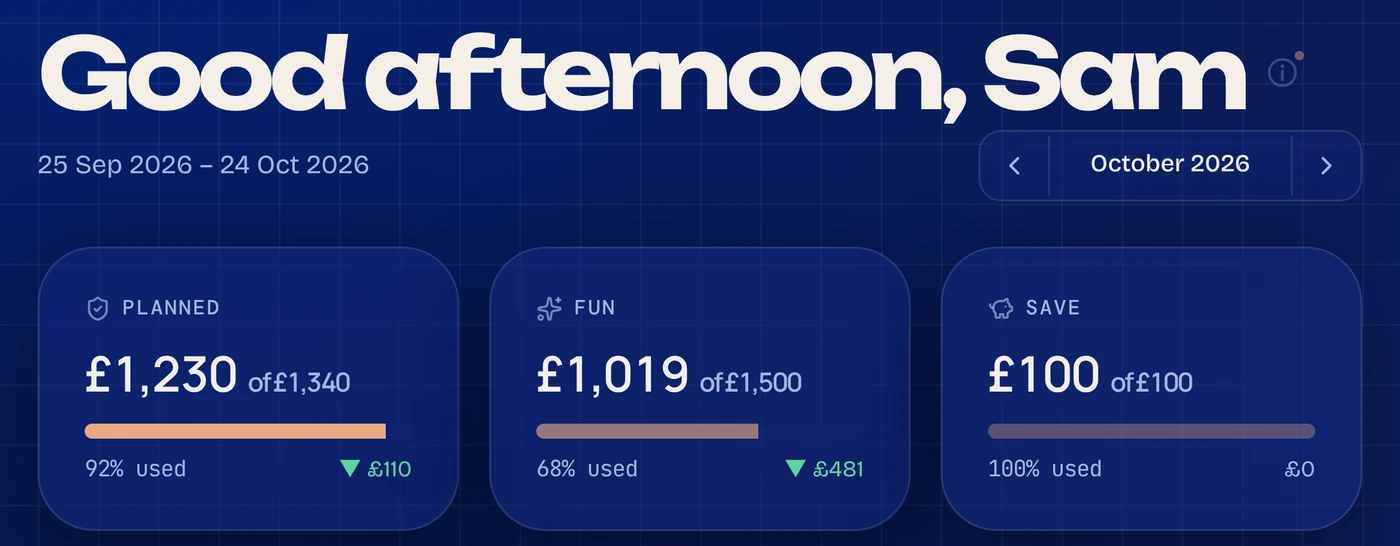
Step 1 of 5
Your money, in periods that match your payday
Everything is measured from one payday to the next, not the 1st to the 31st. Planned, Fun and Save show at a glance where this period's money is going.
Then it's your own numbers, not Sam's.
Less financial admin. More useful answers.
Yamma turns the numbers into the few things worth knowing and doing.
Know where you stand
Lock your bills, like rent and subscriptions, and Yamma sets them aside on payday. Home then shows what is really left to spend today, this week and until payday.
Home · Transactions · Budget
See what is coming
Spot subscriptions, expensive weeks and forecast changes before they land.
Forecasts · Subscriptions · Alerts
Ask Yamma anything
Ask whether you can afford something, why a category ran over, or what to do next. Yamma answers from your own numbers, not a guess.
Ask Yamma · Affordability · Plans
Build toward something
Track savings pace, net worth and debt payoff without turning money into a second job.
Savings · Accounts · Debt
All of it runs on data you keep control of: read-only, never sold, never used for ads. See how Yamma protects it
Don't just view your finances. Ask what to do next.
Ask in plain English, from whether you can afford something to why a category ran over. Ask Yamma answers from your own transactions and budget, with a real figure behind every line and, where there is something to do about it, a button to do it.
Ask Yamma is on Premium. The "Can I afford this?" checker, which works the same maths from a short form, is on Pro.
See what's included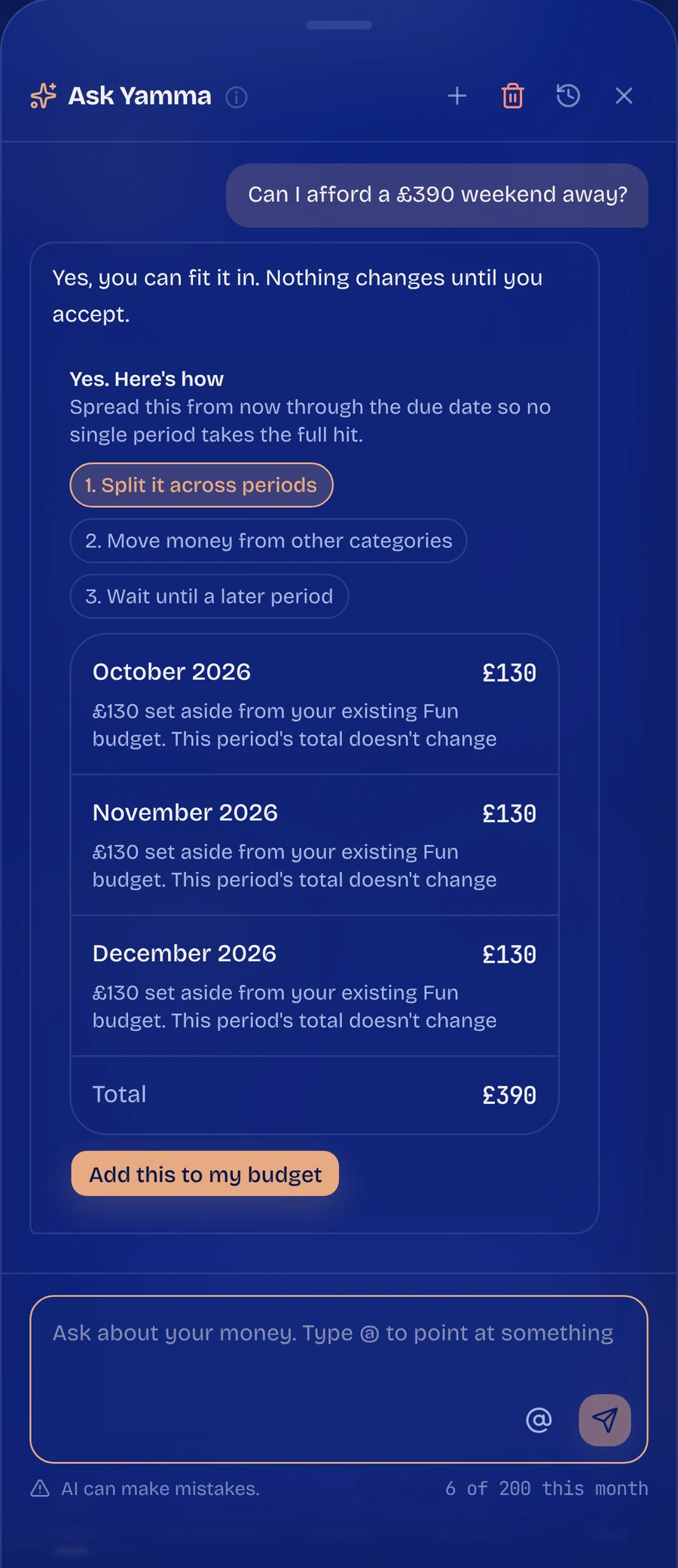
Here to help you keep more of your money.
Your data is used to work out your own numbers and to make Yamma better at that. It is never sold, never brokered, and never used to target you with ads.
Read-only, always
Yamma reads the transactions you connect and nothing else. It can't move your money or set up a payment.
Your data is yours alone
Your account's data is kept completely separate from everyone else's, and only ever visible to you.
No ads, ever
Yamma is paid for by subscriptions. Your data is never sold, never brokered, and never used to target you with ads.
AI only when you switch it on
AI features are off until you turn them on. When they're on, Yamma sends Anthropic your amounts, category names and the merchant text from your statements, plus anything you write in the optional note about your finances. Never your name, email, account number, sort code or bank login.
You sign in with your bank, not with us
Bank connections go through a licensed Open Banking provider. You authorise it on your own bank's site, so your banking details never touch Yamma.
Leave whenever you like
Pause a connection and keep your setup, disconnect it entirely, or delete your account and everything in it. No retention games.
Start with what you need.
Three plans, each doing exactly what it says. Begin with everyday budgeting, then add direct bank connections and forecasting, or shared household tools, when you're ready.
Basic
A calm, clear place to understand your everyday money.
Free forever · No card needed
- Direct CSV upload from any bank
- 1 Google Sheets connection
- Unlimited transactions
- Automatic categorisation
- Home dashboard & activity timeline
- Budgets, periods & rollover
- Subscription detection
- Notes & reminders
Pro
Connect your bank directly, see what's coming, and test decisions before you make them.
Cancel anytime
Everything in Basic, plus
- Help centre assistant: quick answers about how Yamma works
- Up to 2 bank connections
- Spending forecasts with AI-powered outlook
- Savings goals, pace tracking & AI insights
- Budget plans & one-off expenses
- "Can I afford this?" checker
- Subscription price-rise alerts
- Yamma's take: an AI reading of your period
- Missed payment plan alerts
- Payment plans in your budget
- AI-suggested budget split from your income and spending
- Up to 2 Google Sheets connections
- Up to 90 AI refreshes and questions a month
- Point your own AI tools at your dataComing soon
Premium
Every account, the whole household, and a plan for clearing what you owe.
Cancel anytime
Everything in Pro, plus
- Ask Yamma: chat about your own money, with every figure checked
- Up to 5 bank connections
- Shared household mode
- Debt payoff planner
- Up to 5 Google Sheets connections
- Up to 200 AI refreshes and questions a month
Basic is free, with no card needed. Premium's 14-day free trial takes a card up front but charges nothing until it ends. Pro starts billing straight away.
Need more bank connections than your plan includes? Add extra ones for £0.75 each a month on Pro or Premium.